
English

Prompts
- Introduction
- Installation
- Available Prompts
- Transforming Input Before Validation
- Forms
- Informational Messages
- Tables
- Spin
- Progress Bar
- Task
- Stream
- Terminal Title
- Notifications
- Clearing the Terminal
- Terminal Considerations
- Unsupported Environments and Fallbacks
- Testing
Introduction
Laravel Prompts is a PHP package for adding beautiful and user-friendly forms to your command-line applications, with browser-like features including placeholder text and validation.
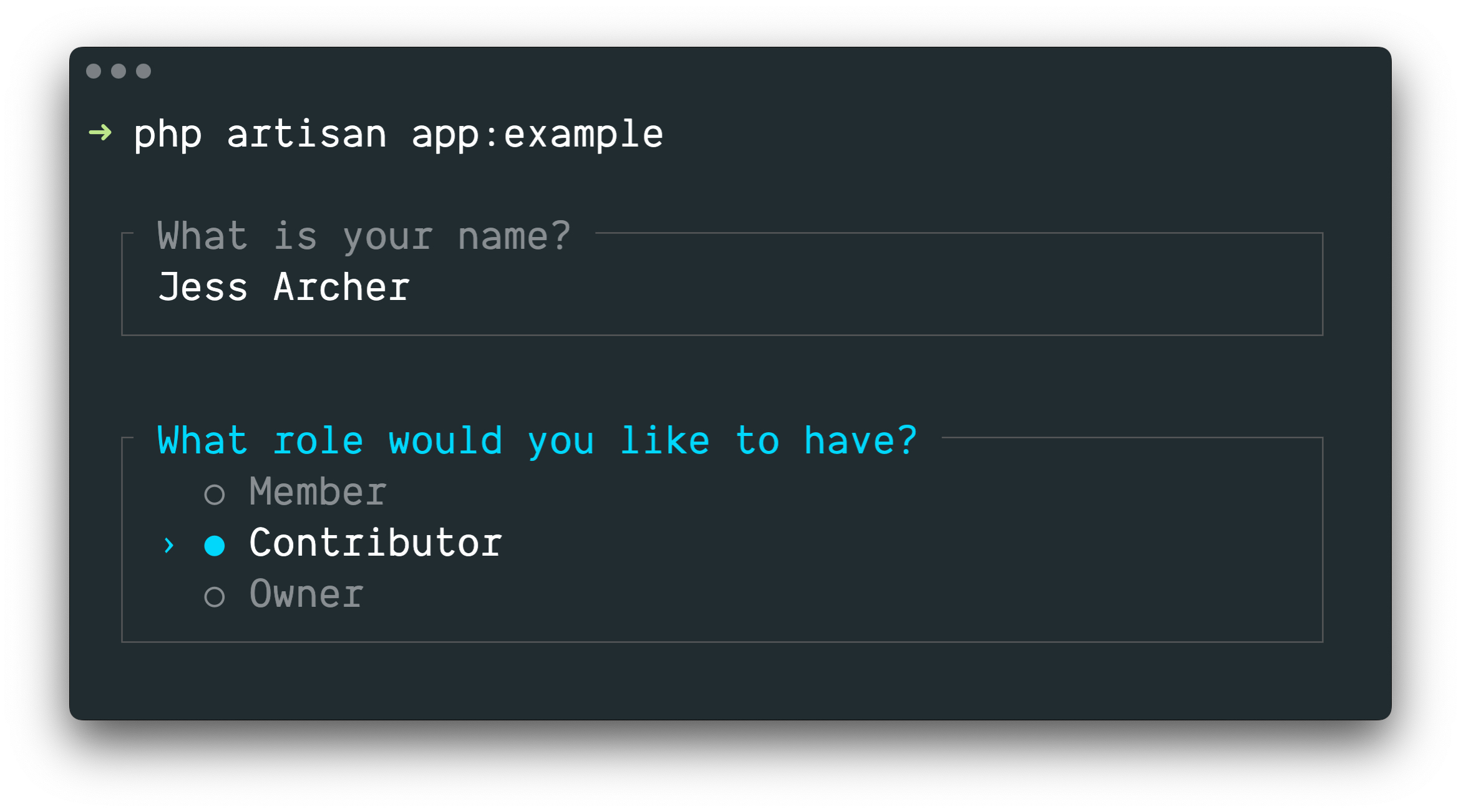
Laravel Prompts is perfect for accepting user input in your Artisan console commands, but it may also be used in any command-line PHP project.
NOTE
Laravel Prompts supports macOS, Linux, and Windows with WSL. For more information, please see our documentation on unsupported environments & fallbacks.
Installation
Laravel Prompts is already included with the latest release of Laravel.
Laravel Prompts may also be installed in your other PHP projects by using the Composer package manager:
shell
composer require laravel/promptsAvailable Prompts
Text
The text function will prompt the user with the given question, accept their input, and then return it:
php
use function Laravel\Prompts\text;

$name = text('What is your name?');You may also include placeholder text, a default value, and an informational hint:
php
$name = text(
    label: 'What is your name?',
    placeholder: 'E.g. Taylor Otwell',
    default: $user?->name,
    hint: 'This will be displayed on your profile.'
);Required Values
If you require a value to be entered, you may pass the required argument:
php
$name = text(
    label: 'What is your name?',
    required: true
);If you would like to customize the validation message, you may also pass a string:
php
$name = text(
    label: 'What is your name?',
    required: 'Your name is required.'
);Additional Validation
Finally, if you would like to perform additional validation logic, you may pass a closure to the validate argument:
php
$name = text(
    label: 'What is your name?',
    validate: fn (string $value) => match (true) {
        strlen($value) < 3 => 'The name must be at least 3 characters.',
        strlen($value) > 255 => 'The name must not exceed 255 characters.',
        default => null
    }
);The closure will receive the value that has been entered and may return an error message, or null if the validation passes.
Alternatively, you may leverage the power of Laravel's validator. To do so, provide an array containing the name of the attribute and the desired validation rules to the validate argument:
php
$name = text(
    label: 'What is your name?',
    validate: ['name' => 'required|max:255|unique:users']
);Textarea
The textarea function will prompt the user with the given question, accept their input via a multi-line textarea, and then return it:
php
use function Laravel\Prompts\textarea;

$story = textarea('Tell me a story.');You may also include placeholder text, a default value, and an informational hint:
php
$story = textarea(
    label: 'Tell me a story.',
    placeholder: 'This is a story about...',
    hint: 'This will be displayed on your profile.'
);Required Values
If you require a value to be entered, you may pass the required argument:
php
$story = textarea(
    label: 'Tell me a story.',
    required: true
);If you would like to customize the validation message, you may also pass a string:
php
$story = textarea(
    label: 'Tell me a story.',
    required: 'A story is required.'
);Additional Validation
Finally, if you would like to perform additional validation logic, you may pass a closure to the validate argument:
php
$story = textarea(
    label: 'Tell me a story.',
    validate: fn (string $value) => match (true) {
        strlen($value) < 250 => 'The story must be at least 250 characters.',
        strlen($value) > 10000 => 'The story must not exceed 10,000 characters.',
        default => null
    }
);The closure will receive the value that has been entered and may return an error message, or null if the validation passes.
Alternatively, you may leverage the power of Laravel's validator. To do so, provide an array containing the name of the attribute and the desired validation rules to the validate argument:
php
$story = textarea(
    label: 'Tell me a story.',
    validate: ['story' => 'required|max:10000']
);Number
The number function will prompt the user with the given question, accept their numeric input, and then return it. The number function allows the user to use the up and down arrow keys to manipulate the number:
php
use function Laravel\Prompts\number;

$number = number('How many copies would you like?');You may also include placeholder text, a default value, and an informational hint:
php
$name = number(
    label: 'How many copies would you like?',
    placeholder: '5',
    default: 1,
    hint: 'This will be determine how many copies to create.'
);Required Values
If you require a value to be entered, you may pass the required argument:
php
$copies = number(
    label: 'How many copies would you like?',
    required: true
);If you would like to customize the validation message, you may also pass a string:
php
$copies = number(
    label: 'How many copies would you like?',
    required: 'A number of copies is required.'
);Additional Validation
Finally, if you would like to perform additional validation logic, you may pass a closure to the validate argument:
php
$copies = number(
    label: 'How many copies would you like?',
    validate: fn (?int $value) => match (true) {
        $value < 1 => 'At least one copy is required.',
        $value > 100 => 'You may not create more than 100 copies.',
        default => null
    }
);The closure will receive the value that has been entered and may return an error message, or null if the validation passes.
Alternatively, you may leverage the power of Laravel's validator. To do so, provide an array containing the name of the attribute and the desired validation rules to the validate argument:
php
$copies = number(
    label: 'How many copies would you like?',
    validate: ['copies' => 'required|integer|min:1|max:100']
);Password
The password function is similar to the text function, but the user's input will be masked as they type in the console. This is useful when asking for sensitive information such as passwords:
php
use function Laravel\Prompts\password;

$password = password('What is your password?');You may also include placeholder text and an informational hint:
php
$password = password(
    label: 'What is your password?',
    placeholder: 'password',
    hint: 'Minimum 8 characters.'
);Required Values
If you require a value to be entered, you may pass the required argument:
php
$password = password(
    label: 'What is your password?',
    required: true
);If you would like to customize the validation message, you may also pass a string:
php
$password = password(
    label: 'What is your password?',
    required: 'The password is required.'
);Additional Validation
Finally, if you would like to perform additional validation logic, you may pass a closure to the validate argument:
php
$password = password(
    label: 'What is your password?',
    validate: fn (string $value) => match (true) {
        strlen($value) < 8 => 'The password must be at least 8 characters.',
        default => null
    }
);The closure will receive the value that has been entered and may return an error message, or null if the validation passes.
Alternatively, you may leverage the power of Laravel's validator. To do so, provide an array containing the name of the attribute and the desired validation rules to the validate argument:
php
$password = password(
    label: 'What is your password?',
    validate: ['password' => 'min:8']
);Confirm
If you need to ask the user for a "yes or no" confirmation, you may use the confirm function. Users may use the arrow keys or press y or n to select their response. This function will return either true or false.
php
use function Laravel\Prompts\confirm;

$confirmed = confirm('Do you accept the terms?');You may also include a default value, customized wording for the "Yes" and "No" labels, and an informational hint:
php
$confirmed = confirm(
    label: 'Do you accept the terms?',
    default: false,
    yes: 'I accept',
    no: 'I decline',
    hint: 'The terms must be accepted to continue.'
);Requiring "Yes"
If necessary, you may require your users to select "Yes" by passing the required argument:
php
$confirmed = confirm(
    label: 'Do you accept the terms?',
    required: true
);If you would like to customize the validation message, you may also pass a string:
php
$confirmed = confirm(
    label: 'Do you accept the terms?',
    required: 'You must accept the terms to continue.'
);Select
If you need the user to select from a predefined set of choices, you may use the select function:
php
use function Laravel\Prompts\select;

$role = select(
    label: 'What role should the user have?',
    options: ['Member', 'Contributor', 'Owner']
);You may also specify the default choice and an informational hint:
php
$role = select(
    label: 'What role should the user have?',
    options: ['Member', 'Contributor', 'Owner'],
    default: 'Owner',
    hint: 'The role may be changed at any time.'
);You may also pass an associative array to the options argument to have the selected key returned instead of its value:
php
$role = select(
    label: 'What role should the user have?',
    options: [
        'member' => 'Member',
        'contributor' => 'Contributor',
        'owner' => 'Owner',
    ],
    default: 'owner'
);Up to five options will be displayed before the list begins to scroll. You may customize this by passing the scroll argument:
php
$role = select(
    label: 'Which category would you like to assign?',
    options: Category::pluck('name', 'id'),
    scroll: 10
);Secondary Information
The info argument may be used to display additional information about the currently highlighted option. When a closure is provided, it will receive the value of the currently highlighted option and should return a string or null:
php
$role = select(
    label: 'What role should the user have?',
    options: [
        'member' => 'Member',
        'contributor' => 'Contributor',
        'owner' => 'Owner',
    ],
    info: fn (string $value) => match ($value) {
        'member' => 'Can view and comment.',
        'contributor' => 'Can view, comment, and edit.',
        'owner' => 'Full access to all resources.',
        default => null,
    }
);You may also pass a static string to the info argument if the information does not depend on the highlighted option:
php
$role = select(
    label: 'What role should the user have?',
    options: ['Member', 'Contributor', 'Owner'],
    info: 'The role may be changed at any time.'
);Additional Validation
Unlike other prompt functions, the select function doesn't accept the required argument because it is not possible to select nothing. However, you may pass a closure to the validate argument if you need to present an option but prevent it from being selected:
php
$role = select(
    label: 'What role should the user have?',
    options: [
        'member' => 'Member',
        'contributor' => 'Contributor',
        'owner' => 'Owner',
    ],
    validate: fn (string $value) =>
        $value === 'owner' && User::where('role', 'owner')->exists()
            ? 'An owner already exists.'
            : null
);If the options argument is an associative array, then the closure will receive the selected key, otherwise it will receive the selected value. The closure may return an error message, or null if the validation passes.
Multi-select
If you need the user to be able to select multiple options, you may use the multiselect function:
php
use function Laravel\Prompts\multiselect;

$permissions = multiselect(
    label: 'What permissions should be assigned?',
    options: ['Read', 'Create', 'Update', 'Delete']
);You may also specify default choices and an informational hint:
php
use function Laravel\Prompts\multiselect;

$permissions = multiselect(
    label: 'What permissions should be assigned?',
    options: ['Read', 'Create', 'Update', 'Delete'],
    default: ['Read', 'Create'],
    hint: 'Permissions may be updated at any time.'
);You may also pass an associative array to the options argument to return the selected options' keys instead of their values:
php
$permissions = multiselect(
    label: 'What permissions should be assigned?',
    options: [
        'read' => 'Read',
        'create' => 'Create',
        'update' => 'Update',
        'delete' => 'Delete',
    ],
    default: ['read', 'create']
);Up to five options will be displayed before the list begins to scroll. You may customize this by passing the scroll argument:
php
$categories = multiselect(
    label: 'What categories should be assigned?',
    options: Category::pluck('name', 'id'),
    scroll: 10
);Secondary Information
The info argument may be used to display additional information about the currently highlighted option. When a closure is provided, it will receive the value of the currently highlighted option and should return a string or null:
php
$permissions = multiselect(
    label: 'What permissions should be assigned?',
    options: [
        'read' => 'Read',
        'create' => 'Create',
        'update' => 'Update',
        'delete' => 'Delete',
    ],
    info: fn (string $value) => match ($value) {
        'read' => 'View resources and their properties.',
        'create' => 'Create new resources.',
        'update' => 'Modify existing resources.',
        'delete' => 'Permanently remove resources.',
        default => null,
    }
);Requiring a Value
By default, the user may select zero or more options. You may pass the required argument to enforce one or more options instead:
php
$categories = multiselect(
    label: 'What categories should be assigned?',
    options: Category::pluck('name', 'id'),
    required: true
);If you would like to customize the validation message, you may provide a string to the required argument:
php
$categories = multiselect(
    label: 'What categories should be assigned?',
    options: Category::pluck('name', 'id'),
    required: 'You must select at least one category'
);Additional Validation
You may pass a closure to the validate argument if you need to present an option but prevent it from being selected:
php
$permissions = multiselect(
    label: 'What permissions should the user have?',
    options: [
        'read' => 'Read',
        'create' => 'Create',
        'update' => 'Update',
        'delete' => 'Delete',
    ],
    validate: fn (array $values) => ! in_array('read', $values)
        ? 'All users require the read permission.'
        : null
);If the options argument is an associative array then the closure will receive the selected keys, otherwise it will receive the selected values. The closure may return an error message, or null if the validation passes.
Suggest
The suggest function can be used to provide auto-completion for possible choices. The user can still provide any answer, regardless of the auto-completion hints:
php
use function Laravel\Prompts\suggest;

$name = suggest('What is your name?', ['Taylor', 'Dayle']);Alternatively, you may pass a closure as the second argument to the suggest function. The closure will be called each time the user types an input character. The closure should accept a string parameter containing the user's input so far and return an array of options for auto-completion:
php
$name = suggest(
    label: 'What is your name?',
    options: fn ($value) => collect(['Taylor', 'Dayle'])
        ->filter(fn ($name) => Str::contains($name, $value, ignoreCase: true))
)You may also include placeholder text, a default value, and an informational hint:
php
$name = suggest(
    label: 'What is your name?',
    options: ['Taylor', 'Dayle'],
    placeholder: 'E.g. Taylor',
    default: $user?->name,
    hint: 'This will be displayed on your profile.'
);Secondary Information
The info argument may be used to display additional information about the currently highlighted option. When a closure is provided, it will receive the value of the currently highlighted option and should return a string or null:
php
$name = suggest(
    label: 'What is your name?',
    options: ['Taylor', 'Dayle'],
    info: fn (string $value) => match ($value) {
        'Taylor' => 'Administrator',
        'Dayle' => 'Contributor',
        default => null,
    }
);Required Values
If you require a value to be entered, you may pass the required argument:
php
$name = suggest(
    label: 'What is your name?',
    options: ['Taylor', 'Dayle'],
    required: true
);If you would like to customize the validation message, you may also pass a string:
php
$name = suggest(
    label: 'What is your name?',
    options: ['Taylor', 'Dayle'],
    required: 'Your name is required.'
);Additional Validation
Finally, if you would like to perform additional validation logic, you may pass a closure to the validate argument:
php
$name = suggest(
    label: 'What is your name?',
    options: ['Taylor', 'Dayle'],
    validate: fn (string $value) => match (true) {
        strlen($value) < 3 => 'The name must be at least 3 characters.',
        strlen($value) > 255 => 'The name must not exceed 255 characters.',
        default => null
    }
);The closure will receive the value that has been entered and may return an error message, or null if the validation passes.
Alternatively, you may leverage the power of Laravel's validator. To do so, provide an array containing the name of the attribute and the desired validation rules to the validate argument:
php
$name = suggest(
    label: 'What is your name?',
    options: ['Taylor', 'Dayle'],
    validate: ['name' => 'required|min:3|max:255']
);Search
If you have a lot of options for the user to select from, the search function allows the user to type a search query to filter the results before using the arrow keys to select an option:
php
use function Laravel\Prompts\search;

$id = search(
    label: 'Search for the user that should receive the mail',
    options: fn (string $value) => strlen($value) > 0
        ? User::whereLike('name', "%{$value}%")->pluck('name', 'id')->all()
        : []
);The closure will receive the text that has been typed by the user so far and must return an array of options. If you return an associative array then the selected option's key will be returned, otherwise its value will be returned instead.
When filtering an array where you intend to return the value, you should use the array_values function or the values Collection method to ensure the array doesn't become associative:
php
$names = collect(['Taylor', 'Abigail']);

$selected = search(
    label: 'Search for the user that should receive the mail',
    options: fn (string $value) => $names
        ->filter(fn ($name) => Str::contains($name, $value, ignoreCase: true))
        ->values()
        ->all(),
);You may also include placeholder text and an informational hint:
php
$id = search(
    label: 'Search for the user that should receive the mail',
    placeholder: 'E.g. Taylor Otwell',
    options: fn (string $value) => strlen($value) > 0
        ? User::whereLike('name', "%{$value}%")->pluck('name', 'id')->all()
        : [],
    hint: 'The user will receive an email immediately.'
);Up to five options will be displayed before the list begins to scroll. You may customize this by passing the scroll argument:
php
$id = search(
    label: 'Search for the user that should receive the mail',
    options: fn (string $value) => strlen($value) > 0
        ? User::whereLike('name', "%{$value}%")->pluck('name', 'id')->all()
        : [],
    scroll: 10
);Secondary Information
The info argument may be used to display additional information about the currently highlighted option. When a closure is provided, it will receive the value of the currently highlighted option and should return a string or null:
php
$id = search(
    label: 'Search for the user that should receive the mail',
    options: fn (string $value) => strlen($value) > 0
        ? User::whereLike('name', "%{$value}%")->pluck('name', 'id')->all()
        : [],
    info: fn (int $userId) => User::find($userId)?->email
);Additional Validation
If you would like to perform additional validation logic, you may pass a closure to the validate argument:
php
$id = search(
    label: 'Search for the user that should receive the mail',
    options: fn (string $value) => strlen($value) > 0
        ? User::whereLike('name', "%{$value}%")->pluck('name', 'id')->all()
        : [],
    validate: function (int|string $value) {
        $user = User::findOrFail($value);

        if ($user->opted_out) {
            return 'This user has opted-out of receiving mail.';
        }
    }
);If the options closure returns an associative array, then the closure will receive the selected key, otherwise, it will receive the selected value. The closure may return an error message, or null if the validation passes.
Multi-search
If you have a lot of searchable options and need the user to be able to select multiple items, the multisearch function allows the user to type a search query to filter the results before using the arrow keys and space-bar to select options:
php
use function Laravel\Prompts\multisearch;

$ids = multisearch(
    'Search for the users that should receive the mail',
    fn (string $value) => strlen($value) > 0
        ? User::whereLike('name', "%{$value}%")->pluck('name', 'id')->all()
        : []
);The closure will receive the text that has been typed by the user so far and must return an array of options. If you return an associative array then the selected options' keys will be returned; otherwise, their values will be returned instead.
When filtering an array where you intend to return the value, you should use the array_values function or the values Collection method to ensure the array doesn't become associative:
php
$names = collect(['Taylor', 'Abigail']);

$selected = multisearch(
    label: 'Search for the users that should receive the mail',
    options: fn (string $value) => $names
        ->filter(fn ($name) => Str::contains($name, $value, ignoreCase: true))
        ->values()
        ->all(),
);You may also include placeholder text and an informational hint:
php
$ids = multisearch(
    label: 'Search for the users that should receive the mail',
    placeholder: 'E.g. Taylor Otwell',
    options: fn (string $value) => strlen($value) > 0
        ? User::whereLike('name', "%{$value}%")->pluck('name', 'id')->all()
        : [],
    hint: 'The user will receive an email immediately.'
);Up to five options will be displayed before the list begins to scroll. You may customize this by providing the scroll argument:
php
$ids = multisearch(
    label: 'Search for the users that should receive the mail',
    options: fn (string $value) => strlen($value) > 0
        ? User::whereLike('name', "%{$value}%")->pluck('name', 'id')->all()
        : [],
    scroll: 10
);Secondary Information
The info argument may be used to display additional information about the currently highlighted option. When a closure is provided, it will receive the value of the currently highlighted option and should return a string or null:
php
$ids = multisearch(
    label: 'Search for the users that should receive the mail',
    options: fn (string $value) => strlen($value) > 0
        ? User::whereLike('name', "%{$value}%")->pluck('name', 'id')->all()
        : [],
    info: fn (int $userId) => User::find($userId)?->email
);Requiring a Value
By default, the user may select zero or more options. You may pass the required argument to enforce one or more options instead:
php
$ids = multisearch(
    label: 'Search for the users that should receive the mail',
    options: fn (string $value) => strlen($value) > 0
        ? User::whereLike('name', "%{$value}%")->pluck('name', 'id')->all()
        : [],
    required: true
);If you would like to customize the validation message, you may also provide a string to the required argument:
php
$ids = multisearch(
    label: 'Search for the users that should receive the mail',
    options: fn (string $value) => strlen($value) > 0
        ? User::whereLike('name', "%{$value}%")->pluck('name', 'id')->all()
        : [],
    required: 'You must select at least one user.'
);Additional Validation
If you would like to perform additional validation logic, you may pass a closure to the validate argument:
php
$ids = multisearch(
    label: 'Search for the users that should receive the mail',
    options: fn (string $value) => strlen($value) > 0
        ? User::whereLike('name', "%{$value}%")->pluck('name', 'id')->all()
        : [],
    validate: function (array $values) {
        $optedOut = User::whereLike('name', '%a%')->findMany($values);

        if ($optedOut->isNotEmpty()) {
            return $optedOut->pluck('name')->join(', ', ', and ').' have opted out.';
        }
    }
);If the options closure returns an associative array, then the closure will receive the selected keys; otherwise, it will receive the selected values. The closure may return an error message, or null if the validation passes.
Pause
The pause function may be used to display informational text to the user and wait for them to confirm their desire to proceed by pressing the Enter / Return key:
php
use function Laravel\Prompts\pause;

pause('Press ENTER to continue.');Autocomplete
The autocomplete function can be used to provide inline auto-completion for possible choices. As the user types, suggestions that match their input will appear as ghost text that can be accepted by pressing Tab or the right arrow key:
php
use function Laravel\Prompts\autocomplete;

$name = autocomplete(
    label: 'What is your name?',
    options: ['Taylor', 'Dayle', 'Jess', 'Nuno', 'Tim']
);You may also include placeholder text, a default value, and an informational hint:
php
$name = autocomplete(
    label: 'What is your name?',
    options: ['Taylor', 'Dayle', 'Jess', 'Nuno', 'Tim'],
    placeholder: 'E.g. Taylor',
    default: $user?->name,
    hint: 'Use tab to accept, up/down to cycle.'
);Dynamic Options
You may also pass a closure to dynamically generate options based on the user's input. The closure will be called each time the user types a character and should return an array of options for auto-completion:
php
$file = autocomplete(
    label: 'Which file?',
    options: fn (string $value) => collect($files)
        ->filter(fn ($file) => str_starts_with(strtolower($file), strtolower($value)))
        ->values()
        ->all(),
);Required Values
If you require a value to be entered, you may pass the required argument:
php
$name = autocomplete(
    label: 'What is your name?',
    options: ['Taylor', 'Dayle', 'Jess', 'Nuno', 'Tim'],
    required: true
);If you would like to customize the validation message, you may also pass a string:
php
$name = autocomplete(
    label: 'What is your name?',
    options: ['Taylor', 'Dayle', 'Jess', 'Nuno', 'Tim'],
    required: 'Your name is required.'
);Additional Validation
Finally, if you would like to perform additional validation logic, you may pass a closure to the validate argument:
php
$name = autocomplete(
    label: 'What is your name?',
    options: ['Taylor', 'Dayle', 'Jess', 'Nuno', 'Tim'],
    validate: fn (string $value) => match (true) {
        strlen($value) < 3 => 'The name must be at least 3 characters.',
        strlen($value) > 255 => 'The name must not exceed 255 characters.',
        default => null
    }
);The closure will receive the value that has been entered and may return an error message, or null if the validation passes.
Transforming Input Before Validation
Sometimes you may want to transform the prompt input before validation takes place. For example, you may wish to remove white space from any provided strings. To accomplish this, many of the prompt functions provide a transform argument, which accepts a closure:
php
$name = text(
    label: 'What is your name?',
    transform: fn (string $value) => trim($value),
    validate: fn (string $value) => match (true) {
        strlen($value) < 3 => 'The name must be at least 3 characters.',
        strlen($value) > 255 => 'The name must not exceed 255 characters.',
        default => null
    }
);Forms
Often, you will have multiple prompts that will be displayed in sequence to collect information before performing additional actions. You may use the form function to create a grouped set of prompts for the user to complete:
php
use function Laravel\Prompts\form;

$responses = form()
    ->text('What is your name?', required: true)
    ->password('What is your password?', validate: ['password' => 'min:8'])
    ->confirm('Do you accept the terms?')
->submit();The submit method will return a numerically indexed array containing all of the responses from the form's prompts. However, you may provide a name for each prompt via the name argument. When a name is provided, the named prompt's response may be accessed via that name:
php
use App\Models\User;
use function Laravel\Prompts\form;

$responses = form()
    ->text('What is your name?', required: true, name: 'name')
    ->password(
        label: 'What is your password?',
        validate: ['password' => 'min:8'],
        name: 'password'
    )
    ->confirm('Do you accept the terms?')
    ->submit();

User::create([
    'name' => $responses['name'],
    'password' => $responses['password'],
]);The primary benefit of using the form function is the ability for the user to return to previous prompts in the form using CTRL + U. This allows the user to fix mistakes or alter selections without needing to cancel and restart the entire form.
If you need more granular control over a prompt in a form, you may invoke the add method instead of calling one of the prompt functions directly. The add method is passed all previous responses provided by the user:
php
use function Laravel\Prompts\form;
use function Laravel\Prompts\outro;
use function Laravel\Prompts\text;

$responses = form()
    ->text('What is your name?', required: true, name: 'name')
    ->add(function ($responses) {
        return text("How old are you, {$responses['name']}?");
    }, name: 'age')
    ->submit();

outro("Your name is {$responses['name']} and you are {$responses['age']} years old.");Informational Messages
The note, info, warning, error, and alert functions may be used to display informational messages:
php
use function Laravel\Prompts\info;

info('Package installed successfully.');Tables
The table function makes it easy to display multiple rows and columns of data. All you need to do is provide the column names and the data for the table:
php
use function Laravel\Prompts\table;

table(
    headers: ['Name', 'Email'],
    rows: User::all(['name', 'email'])->toArray()
);Spin
The spin function displays a spinner along with an optional message while executing a specified callback. It serves to indicate ongoing processes and returns the callback's results upon completion:
php
use function Laravel\Prompts\spin;

$response = spin(
    callback: fn () => Http::get('http://example.com'),
    message: 'Fetching response...'
);WARNING
The spin function requires the PCNTL PHP extension to animate the spinner. When this extension is not available, a static version of the spinner will appear instead.
Progress Bars
For long running tasks, it can be helpful to show a progress bar that informs users how complete the task is. Using the progress function, Laravel will display a progress bar and advance its progress for each iteration over a given iterable value:
php
use function Laravel\Prompts\progress;

$users = progress(
    label: 'Updating users',
    steps: User::all(),
    callback: fn ($user) => $this->performTask($user)
);The progress function acts like a map function and will return an array containing the return value of each iteration of your callback.
The callback may also accept the Laravel\Prompts\Progress instance, allowing you to modify the label and hint on each iteration:
php
$users = progress(
    label: 'Updating users',
    steps: User::all(),
    callback: function ($user, $progress) {
        $progress
            ->label("Updating {$user->name}")
            ->hint("Created on {$user->created_at}");

        return $this->performTask($user);
    },
    hint: 'This may take some time.'
);Sometimes, you may need more manual control over how a progress bar is advanced. First, define the total number of steps the process will iterate through. Then, advance the progress bar via the advance method after processing each item:
php
$progress = progress(label: 'Updating users', steps: 10);

$users = User::all();

$progress->start();

foreach ($users as $user) {
    $this->performTask($user);

    $progress->advance();
}

$progress->finish();Task
The task function displays a labeled task with a spinner and a scrolling live output area while a given callback is executing. It is ideal for wrapping long-running processes such as dependency installation or deployment scripts, providing real-time visibility into what is happening:
php
use function Laravel\Prompts\task;

task(
    label: 'Installing dependencies',
    callback: function ($logger) {
        // Long-running process...
    }
);The callback receives a Logger instance that you may use to display log lines, status messages, and streamed text in the task's output area.
WARNING
The task function requires the PCNTL PHP extension to animate the spinner. When this extension is not available, a static version of the task will appear instead.
Logging Lines
The line method writes a single log line to the task's scrolling output area:
php
task(
    label: 'Installing dependencies',
    callback: function ($logger) {
        $logger->line('Resolving packages...');
        // ...
        $logger->line('Downloading laravel/framework');
        // ...
    }
);Status Messages
You may use the success, warning, and error methods to display status messages. These appear as stable, highlighted messages above the scrolling log area:
php
task(
    label: 'Deploying application',
    callback: function ($logger) {
        $logger->line('Pulling latest changes...');
        // ...
        $logger->success('Changes pulled!');

        $logger->line('Running migrations...');
        // ...
        $logger->warning('No new migrations to run.');

        $logger->line('Clearing cache...');
        // ...
        $logger->success('Cache cleared!');
    }
);Updating the Label
The label method allows you to update the task's label while it is running:
php
task(
    label: 'Starting deployment...',
    callback: function ($logger) {
        $logger->label('Pulling latest changes...');
        // ...
        $logger->label('Running migrations...');
        // ...
        $logger->label('Clearing cache...');
        // ...
    }
);Streaming Text
For processes that produce output incrementally, such as AI-generated responses, the partial method allows you to stream text word-by-word or chunk-by-chunk. Once the stream is complete, call commitPartial to finalize the output:
php
task(
    label: 'Generating response...',
    callback: function ($logger) {
        foreach ($words as $word) {
            $logger->partial($word . ' ');
        }

        $logger->commitPartial();
    }
);Customizing the Output Limit
By default, the task displays up to 10 lines of scrolling output. You may customize this via the limit argument:
php
task(
    label: 'Installing dependencies',
    callback: function ($logger) {
        // ...
    },
    limit: 20
);Stream
The stream function displays text that streams into the terminal, ideal for displaying AI-generated content or any text that arrives incrementally:
php
use function Laravel\Prompts\stream;

$stream = stream();

foreach ($words as $word) {
    $stream->append($word . ' ');
    usleep(25_000); // Simulate delay between chunks...
}

$stream->close();The append method adds text to the stream, rendering it with a gradual fade-in effect. When all content has been streamed, call the close method to finalize the output and restore the cursor.
Terminal Title
The title function updates the title of the user's terminal window or tab:
php
use function Laravel\Prompts\title;

title('Installing Dependencies');To reset the terminal title back to its default, pass an empty string:
php
title('');Notifications
The notify function sends a native desktop notification from the terminal:
php
use function Laravel\Prompts\notify;

notify('Build Complete', 'Deployed to production');Notifications are supported on macOS (via osascript) and Linux (via notify-send with kdialog fallback).
On macOS, you may also include a subtitle and a sound:
php
notify(
    title: 'Build Complete',
    body: 'Deployed to production',
    subtitle: 'staging-server',
    sound: 'Glass',
);On Linux, you may provide a custom icon:
php
notify(
    title: 'Build Complete',
    body: 'Deployed to production',
    icon: '/path/to/icon.png',
);Clearing the Terminal
The clear function may be used to clear the user's terminal:
php
use function Laravel\Prompts\clear;

clear();Terminal Considerations
Terminal Width
If the length of any label, option, or validation message exceeds the number of "columns" in the user's terminal, it will be automatically truncated to fit. Consider minimizing the length of these strings if your users may be using narrower terminals. A typically safe maximum length is 74 characters to support an 80-character terminal.
Terminal Height
For any prompts that accept the scroll argument, the configured value will automatically be reduced to fit the height of the user's terminal, including space for a validation message.
Unsupported Environments and Fallbacks
Laravel Prompts supports macOS, Linux, and Windows with WSL. Due to limitations in the Windows version of PHP, it is not currently possible to use Laravel Prompts on Windows outside of WSL.
For this reason, Laravel Prompts supports falling back to an alternative implementation such as the Symfony Console Question Helper.
NOTE
When using Laravel Prompts with the Laravel framework, fallbacks for each prompt have been configured for you and will be automatically enabled in unsupported environments.
Fallback Conditions
If you are not using Laravel or need to customize when the fallback behavior is used, you may pass a boolean to the fallbackWhen static method on the Prompt class:
php
use Laravel\Prompts\Prompt;

Prompt::fallbackWhen(
    ! $input->isInteractive() || windows_os() || app()->runningUnitTests()
);Fallback Behavior
If you are not using Laravel or need to customize the fallback behavior, you may pass a closure to the fallbackUsing static method on each prompt class:
php
use Laravel\Prompts\TextPrompt;
use Symfony\Component\Console\Question\Question;
use Symfony\Component\Console\Style\SymfonyStyle;

TextPrompt::fallbackUsing(function (TextPrompt $prompt) use ($input, $output) {
    $question = (new Question($prompt->label, $prompt->default ?: null))
        ->setValidator(function ($answer) use ($prompt) {
            if ($prompt->required && $answer === null) {
                throw new \RuntimeException(
                    is_string($prompt->required) ? $prompt->required : 'Required.'
                );
            }

            if ($prompt->validate) {
                $error = ($prompt->validate)($answer ?? '');

                if ($error) {
                    throw new \RuntimeException($error);
                }
            }

            return $answer;
        });

    return (new SymfonyStyle($input, $output))
        ->askQuestion($question);
});Fallbacks must be configured individually for each prompt class. The closure will receive an instance of the prompt class and must return an appropriate type for the prompt.
Testing
Laravel provides a variety of methods for testing that your command displays the expected Prompt messages:
php
test('report generation', function () {
    $this->artisan('report:generate')
        ->expectsPromptsInfo('Welcome to the application!')
        ->expectsPromptsWarning('This action cannot be undone')
        ->expectsPromptsError('Something went wrong')
        ->expectsPromptsAlert('Important notice!')
        ->expectsPromptsIntro('Starting process...')
        ->expectsPromptsOutro('Process completed!')
        ->expectsPromptsTable(
            headers: ['Name', 'Email'],
            rows: [
                ['Taylor Otwell', 'taylor@example.com'],
                ['Jason Beggs', 'jason@example.com'],
            ]
        )
        ->assertExitCode(0);
});php
public function test_report_generation(): void
{
    $this->artisan('report:generate')
        ->expectsPromptsInfo('Welcome to the application!')
        ->expectsPromptsWarning('This action cannot be undone')
        ->expectsPromptsError('Something went wrong')
        ->expectsPromptsAlert('Important notice!')
        ->expectsPromptsIntro('Starting process...')
        ->expectsPromptsOutro('Process completed!')
        ->expectsPromptsTable(
            headers: ['Name', 'Email'],
            rows: [
                ['Taylor Otwell', 'taylor@example.com'],
                ['Jason Beggs', 'jason@example.com'],
            ]
        )
        ->assertExitCode(0);
}